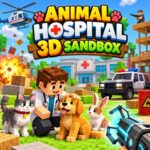



























Animal Hospital 3D Sandbox
About the Game
Animal Hospital 3D Sandbox is a physics-based, open-world game focused on total experimentation. You will not cure pets or manage a clinic here. You get a massive cube-shaped map to test out wild ideas instead. I spent hours stacking blocks just to blow them up and watch the pieces fly. You have full control over the environment. There are no rules, timers, or missions to complete.
🧨 What Can You Do in the Map?
You receive a huge toolbox right from the start. You can place different blocks to construct houses, giant ramps, or elaborate obstacle courses. If you grow tired of your creation, you can easily destroy it. The inventory includes dynamite, explosive barrels, and weapons like shotguns. The ragdoll physics make every explosion highly entertaining to watch. Characters and objects bounce off walls with realistic weight and momentum.
The Gravity Gun This is the best tool in your arsenal. You point it at any object, pick it up, and throw it across the map. You can lift cars, scenery blocks, and even the NPCs walking around the area.
🚗 Vehicles and The Locals
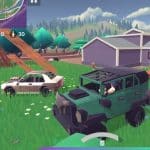
The map contains several drivable vehicles. You can jump into a jeep, a muscle car, or a police car with working sirens. You just hop in and drive off. The vehicle handling is arcade-style and very responsive.
Dealing with NPCs The world is populated by non-playable characters. Each NPC has a specific name and a random mood. Friendly characters sit in chairs and chat with speech bubbles. They will run away in fear if you start causing chaos. Hostile characters behave differently. They will actively hunt you down and shoot at you on sight.
⚖️ Tool Comparison Table
| Tool | Best Use | Impact Level |
| Block Builder | Constructing ramps and houses | Low |
| Gravity Gun | Throwing cars and objects | High |
| Dynamite | Clearing large structures instantly | Maximum |
| Assault Rifle | Defending against hostile NPCs | Medium |
🕹️ Game Controls
You can play this on both PC and mobile devices. Here are the default setups.
PC Controls:
- WASD or Arrow Keys: Move your character.
- Mouse: Look around and aim.
- Left Click: Shoot or use your selected item.
- Right Click: Grab items with the gravity gun.
- Spacebar: Jump.
- E: Enter or exit vehicles.
- Tab: Open the inventory menu.
Mobile Controls:
- Left Joystick: Move your character around the map.
- Right Screen Swipe: Look around and aim.
- Action Buttons: Tap the icons to shoot, jump, or interact with objects.