




























War The Knights
About the Game
War the Knights is a 3D medieval action game where you fight alongside large armies and capture strategic locations across the battlefield. You can choose your weapons, join the Island or Coast faction, and fight against enemy soldiers in battles with up to 200 warriors. Your main objective is to capture important positions, protect your territory, and help your army defeat the opposing faction.
⚔️ Take Part in Large Medieval Battles
Your main task in War the Knights is to capture and defend different battlefield locations. The game uses objective points such as A, B, C, and D. You must reach these positions and fight against enemy soldiers to gain control.
Territory control plays an important role in every battle. Captured locations can serve as respawn points for your allied soldiers. This gives your team a better opportunity to return to the frontline and protect its territory.
You can follow several combat approaches:
- Attack enemy soldiers near important locations.
- Capture strategic points for your faction.
- Defend positions that your army already controls.
- Support allied knights during large battles.
- Move toward enemy territory when your team needs assistance.
🛡️ Choose Your Weapons Before Battle
Your weapon selection determines how you approach different combat situations. War the Knights offers several melee and ranged weapons, along with defensive equipment and useful battlefield items.
Melee Weapons
- Two-handed sword for close-range attacks.
- One-handed sword for regular sword combat.
- Mace for powerful strikes.
- Long spear to attack enemies from a distance.
- Fists for unarmed combat and faster movement.
Ranged Weapons
- Bow for shooting arrows at enemy soldiers.
- Crossbow for ranged attacks.
Defensive and Support Equipment
- Shield for protection during combat.
- Apothecary to heal nearby allied soldiers.
- Banner to restore health to nearby allies over time.
- Ammunition crate to supply your teammates.
You can also use throwing knives, fireballs, fire arrows, explosive barrels, and elixirs. Each item has its own purpose, so choose your equipment according to your preferred combat approach.
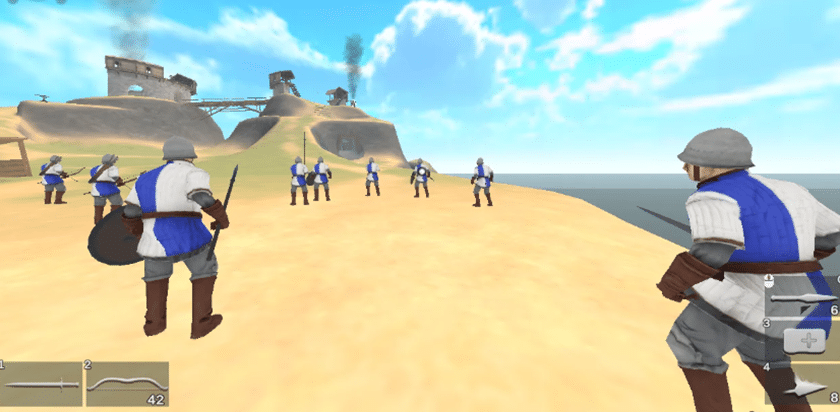
🏰 Explore Different Medieval Battlefields
You can select from several maps before starting a battle. Each location has its own terrain and battlefield layout.
Two Mountains: This map contains elevated terrain and different routes across the battlefield. You can use the landscape to approach enemy positions.
Winter: Fight across a snowy environment with structures and narrow combat areas. Watch your surroundings when you defend important locations.
Central Tower: This battlefield has a prominent central structure. The surrounding area plays an important role in territorial control.
Map selection matters because the terrain can influence your movement, defensive positions, and approach toward enemy objectives.
🔥 Customize Your Army and Battle Settings
War the Knights gives you several settings to control the size and conditions of your battles. You can adjust the number of soldiers and change the balance between the two opposing factions.
Here are some settings you can explore:
- Select your preferred battlefield.
- Change the number of soldiers in the battle.
- Adjust the team balance.
- Set the respawn duration.
- Configure the number of available lives.
The game supports battles with up to 200 warriors. You can experiment with different army sizes and team arrangements to find your preferred battle conditions.
🏹 Island vs Coast – Choose Your Faction
You can fight for either of the two available factions:
- Island: Represented by the blue team.
- Coast: Represented by the red team.
Both factions compete for battlefield control. Your objective remains the same: capture important locations, defeat opposing soldiers, and help your army maintain control of the territory.
There is no traditional story campaign in the browser edition. The main focus is on repeatable battles, weapon selection, and territorial objectives.
🎮 How to Play War the Knights
Your first priority should be to understand the battlefield objectives. Do not focus entirely on individual enemies. Capturing strategic locations is essential to your team's progress.
Follow these steps:
- Choose your faction and preferred weapons.
- Select a battlefield and configure the army settings.
- Enter the battle and locate the nearest capture point.
- Attack enemy soldiers and secure the objective.
- Defend your captured locations against enemy attacks.
- Support your allies with healing and ammunition equipment.
- Continue capturing enemy positions until your team gains control.
💡 Tips for Better Battlefield Performance
- Capture objectives first: Focus on strategic locations instead of chasing distant enemies.
- Select suitable weapons: Use swords and maces for close combat. Choose bows or crossbows for ranged attacks.
- Protect your allies: Use the apothecary and banner to support nearby soldiers.
- Defend your territory: Keep an eye on captured locations because the opposing army can attack them.
- Use the terrain: Elevated areas and structures can influence your approach during combat.
- Manage your equipment: Select suitable gadgets before entering the battlefield.
🖥️ Game Controls
Use the following keyboard and mouse controls to play the desktop browser edition.
| Key | Action |
|---|---|
| W, A, S, D | Move your character |
| Mouse | Look around |
| Left Mouse Button | Attack |
| Right Mouse Button | Block / Aim |
| Shift | Sprint |
| Spacebar | Jump |
| Z | Crouch |
| E | Interact / Pick up items |
| 1, 2 | Switch primary weapons |
| 3, 4 | Use gadgets |
| Middle Mouse Button | Throw equipped item |
| F | Kick |
| G | Throw melee weapon |
| R | Battle cry |
| Esc / P | Open the game menu |