



























Arrow Puzzle
About the Game
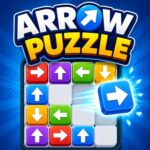
Arrow Puzzle is a logic puzzle game from Easybrain. Your main task is to clear a board filled with arrows. Each arrow points toward its exit direction, but another arrow can block its path.
You need to study the board before you tap. An arrow can leave the grid only when its path ahead is clear. The order of your moves therefore matters. One correct move can open a route for another arrow.
🎯 How the Puzzle Works
The basic rule is easy to understand, but the board requires careful observation.
- Look at the direction of each arrow.
- Find an arrow with a clear route.
- Tap it to remove it from the board.
- Check the newly opened spaces.
- Select another arrow with a free path.
- Continue until the entire board is clear.
If you tap an arrow that has a blocked route, you lose a life. Lives are limited on each level, so random taps can make a level harder to finish.
🔍 The Important Part: Move Order
Your biggest concern is not how quickly you tap. It is which arrow you tap first.
Suppose one arrow blocks another arrow's route. Removing the first arrow can create the opening that the second arrow needs. This creates a sequence of moves that you must recognize from the board.
That structure gives Arrow Puzzle its main logic element. You need to inspect several arrows and decide which move will open the next useful route.
❤️ Lives, Mistakes, and Hints
A blocked selection has a cost because it removes a life. This system encourages you to inspect the board before making a move.
You also have access to hints when a puzzle becomes difficult.
How the Hint Works
- Tap the Hint icon in the bottom-right corner.
- The game highlights an arrow that can safely leave the grid.
- Tap that highlighted arrow to continue.
- The board then has more open space for your next moves.
These steps are documented in Easybrain's official Arrow Puzzle support guide.
🗺️ A Useful Grid Helper
Arrow Puzzle also has a Grid booster.
The Grid booster is a free helper with unlimited use. It shows the directions in which arrows are trying to exit the board. After you make a correct move, the Grid turns off and its guiding lines disappear.
If you make a mistake and an arrow turns red, the game highlights its blocked route in red. This gives you direct visual information about why that move did not work.
⏱️ No Countdown to Beat
Arrow Puzzle does not use a level timer. The official description specifically presents the game as a no-timer experience.
That means you can spend time examining the board before choosing an arrow. The main pressure comes from limited lives rather than a ticking clock.
🏆 Daily Challenges and Tournaments
The regular puzzle levels are not the only activity available.
The current game listing mentions Daily Challenges, monthly challenges, trophies, and tournaments. A Google Play event description also confirms a tournament system in which you clear arrow grids, collect stars, climb a leaderboard, and earn medals.
This gives you additional goals beyond simply clearing the standard boards.
📱 Game Controls
Arrow Puzzle uses touch controls on compatible mobile devices.
- Tap an arrow: Select the arrow and attempt to clear it from the grid.
- Hint: Tap the Hint icon to highlight an arrow that can safely leave.
- Grid: Turn on the Grid booster to display arrow exit directions.
- Board interaction: All core puzzle actions use direct touchscreen taps.