































Super Mario Bros – Level Select
About the Game
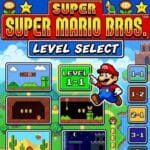
Super Mario Bros – Level Select is a modified NES version of Nintendo's classic Super Mario Bros. that gives you direct access to the game's world-selection feature. The core stages, characters, enemies and power-ups remain based on the original game. The main change concerns progression. You can select a world instead of reaching it through the normal sequence first.
🎮 The Main Difference Is World Access
The standard Super Mario Bros. has eight worlds, with four stages in each world.
Normally, you progress through them in order. The original game does contain a world-select function, but the feature normally becomes available after you complete the game and return to the title screen without switching off the console.
A level-select modification changes that requirement. You can use the selection function to choose the world you want to play.
🕹️ Classic Super Mario Bros. Gameplay Remains
Once you enter a stage, the familiar NES gameplay is still there. You can:
- Run across side-scrolling stages.
- Jump on enemies.
- Break blocks.
- Collect coins.
- Find hidden areas.
- Use Super Mushrooms.
- Use Fire Flowers.
- Collect Starmen.
- Swim through water stages.
- Complete castle levels.
- Reach the flagpole.
🌎 Choose From Eight Worlds
You can select from the game's eight worlds.
World 1 serves as the introductory area.
Worlds 2–4 gradually introduce tougher layouts and enemy arrangements.
Worlds 5–7 require more precise movement.
World 8 contains some of the hardest regular stages in the original game.
The selection feature gives you direct access to these worlds.
👾 Classic Enemies Still Control the Stages
The original enemy roster remains central to the gameplay. You will encounter familiar enemies such as:
- Goombas
- Koopa Troopas
- Buzzy Beetles
- Piranha Plants
- Hammer Bros.
- Lakitus
- Spinies
- Bullet Bills
- Cheep-cheeps
- Bloopers
- Podoboos
- Bowser
🔥 Why This Version Works Well for Practice
The biggest practical advantage is simple: you can reach specific worlds much faster.
Suppose you want to practice World 8. In a normal playthrough, you need to progress through the earlier worlds. With level select, you can go directly to the desired world. That makes the modification useful for:
- Practicing difficult stages
- Studying enemy patterns
- Learning castle layouts
- Testing movement techniques
- Recording gameplay
- Revisiting later worlds
- Preparing for speedrun attempts
🧱 The Original Level Design Still Matters
Level select does not remove the design philosophy of the original Super Mario Bros. Early stages teach basic movement and enemy interactions. Later stages demand better timing and positioning.
You still need to learn:
- Jump distances
- Enemy movement patterns
- Platform spacing
- Pipe locations
- Water movement
- Castle hazards
- Hidden blocks
The modification simply gives you faster access to those lessons.
🎯 How to Use the Level Select Feature
The exact activation method depends on the ROM modification. The documented versions of the modification expose the game's existing world-selection behavior. NES development discussions describe methods that enable world selection from the title screen. Game Genie references also document codes for enabling the feature.
🎮 EmulatorJS Controls
| Action | NES Button |
| Move Left | D-Pad Left |
| Move Right | D-Pad Right |
| Crouch | D-Pad Down |
| Jump | A |
| Run | B |
| Fireball | B |
| Start / Pause | Start |
📱 Mobile Controls
| Mobile Button | Action |
| D-Pad | Move and crouch |
| A | Jump |
| B | Run / Fire |
| Start | Start / Pause |
| Select | Select |